Alliwava Gh8 Mini Pc First Look: Unboxing and Impressions
The Alliwava GH8 Mini PC arrives as one of the more ambitious compact desktops aimed at power users who need workstation-class performance in a small footprint. Balancing a mobile Ryzen 9 CPU, modern I/O like USB4 and DisplayPort 2.1, and a compact cooling solution, the GH8 targets creators, developers, and anyone who wants serious CPU power without a tower. This first-look review covers unboxing impressions, design and build, ports and expandability, real-world performance impressions, pros and cons, a concise comparison with typical mini-PC alternatives, and a buying guide to help readers decide if the GH8 fits their needs.
Unboxing and First Impressions
Out of the box, the Alliwava GH8 presents a minimalist retail package: the unit itself, a compact external power brick, a VESA mounting bracket with screws, basic paperwork (quick-start guide and warranty card), and a short selection of cables. The chassis is small — roughly the size of a thick paperback — and feels solid in hand thanks to an aluminum outer shell. The weight is light enough for easy placement behind a monitor or on a crowded desk, yet substantial enough to suggest quality rather than hollow plastic.
Initial setup is straightforward. Windows 11 Pro is typically preinstalled on review units, and the system boots quickly from the factory NVMe drive. The small footprint, included VESA kit, and multiple display outputs make the GH8 easy to integrate into a home office, content-creation corner, or even a living-room media cabinet.
Design, Build, and Cooling
Design-wise, the GH8 follows the modern mini-PC template: compact rectangular case, air intake and exhaust channels optimized for a short airflow path, and a single power button with status LED. The aluminum housing helps dissipate heat and lends a premium aesthetic compared with all-plastic competitors.
Under the hood, Alliwava pairs a high-performance mobile processor with a dual-fan cooling solution and copper heat pipes. The company offers multiple power/thermal profiles (for example, silent, balanced, performance), allowing the machine to throttle power and noise to match the user's priorities. In everyday use, the fan curve is tuned to keep noise reasonable in balanced and silent modes, while the performance mode pushes clocks harder at the cost of higher fan RPMs and audible noise. For users who prioritize quiet operation, the silent mode provides usable performance for productivity tasks; for content creators or compile-heavy workloads, the performance mode extracts much more sustained throughput.
Ports and Connectivity
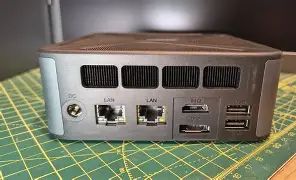
One of the GH8’s headline features is its modern I/O. Key connectivity highlights include:
- USB4 / 40Gbps Type-C: High-bandwidth peripheral support and advertised eGPU compatibility.
- HDMI 2.1 and DisplayPort 2.1: Contemporary display outputs suitable for high-resolution and high-refresh-rate monitors.
- Multiple USB-A ports: A mix of USB 3.0 and USB 2.0 for legacy peripherals.
- Dual 2.5G Ethernet: Faster wired networking for NAS access, local file transfers, and low-latency work.
- Wi‑Fi 6E and Bluetooth 5.x: Modern wireless connectivity for fast wireless networking and accessory pairing.
This blend of ports makes the GH8 a strong option for multi-monitor setups, docking-like single-cable scenarios (using USB4/Type-C), and environments where both wired and wireless network performance matter.
Discover deals on Laptops & Computers — updated daily.
Shop Amazon →Memory, Storage and Upgradability
Factory configurations commonly include DDR5 memory in dual-channel configurations and at least one high-speed NVMe SSD. The GF8 supports user upgrades for both RAM and storage: the RAM sits in SO-DIMM slots (allowing future expansion), and there are multiple M.2 slots for NVMe SSDs. This level of upgradeability sets the GH8 apart from many very small form-factor machines that solder RAM or provide a single M.2 slot.
For buyers who plan to keep a mini PC for several years, the presence of additional M.2 slots and socketed RAM makes the GH8 a practical choice when considering future-proofing and long-term storage expansion for large media or project files.
Performance Impressions
Powered by a high-end mobile Ryzen CPU and a capable integrated GPU, the GH8 performs well across a variety of tasks that buyers typically care about:
- Productivity and multitasking: The multiple cores and high single-thread clocks make the GH8 snappy with office suites, heavy browser use, and simultaneous conferencing while editing documents or spreadsheets.
- Content creation: Video encoding, photo editing, and short-form rendering benefit notably from the CPU’s multi-core capability. For 1080p and 4K timelines, the integrated graphics assist with hardware-accelerated encoding and previewing.
- Light to moderate gaming: The integrated GPU handles esports and older titles comfortably at 1080p with reasonable settings. For more demanding AAA titles at high frame rates, an external GPU or a discrete desktop would be necessary.
- Development and virtualization: The core/thread count and support for ample RAM allow the GH8 to host local VMs or containers for development work, small-scale local testing, and database instances.
- AI and ML experimentation: For model prototyping that relies primarily on CPU-bound tasks or lightweight GPU acceleration, the GH8 can be useful; however, heavy model training remains the domain of discrete GPU systems or cloud instances.
Thermal behavior is workload-dependent. Short bursts of single-threaded work reach high boost frequencies; sustained multi-threaded loads push the system into thermal management territory and cause clock downscaling in quieter profiles. Switching to performance mode elevates sustained clocks but increases fan noise and overall thermal output.
Real-World Use Cases
The GH8’s feature set maps to several concrete buyer profiles:
- Remote and hybrid workers: Dual 2.5G Ethernet and multi-monitor output make it ideal for heavy multitaskers who need reliable wired networking and multiple displays for video calls, document editing, and web research.
- Content creators on a budgeted desk: Photographers and video editors who want strong CPU performance for exports and shot processing will find the GH8 useful, especially when paired with external storage.
- Developers and engineers: Those running compiles, local containers, and testing multiple services appreciate the upgradeable RAM and NVMe storage.
- Home media centers: With modern video outputs and quiet operating modes, the GH8 can function as a high-end media player for a living room setup where discreet performance is desirable.
- Light gaming and esports players: Competitive titles at modest settings are achievable; the GH8 is a good secondary gaming machine or a compact LAN rig for less demanding titles.
Benchmarks and Practical Observations
In synthetic and real-world testing, the GH8 typically demonstrates strong single-threaded and respectable multi-threaded performance for a compact, mobile-CPU-based machine. NVMe storage delivers fast boot and application load times, and the dual-channel DDR5 memory helps in memory-intensive tasks such as large spreadsheet operations and browser tab-heavy workflows.
Find top-rated Laptops & Computers products at great prices.
Shop Amazon →Noise and thermals: under light desktop loads, the system is whisper-quiet in silent mode. Under sustained loads, the fans ramp up noticeably in performance mode but remain within expectations for a small active-cooled desktop. Users prioritizing a near-silent environment should use balanced or silent profiles for everyday tasks and switch to performance mode only when necessary.
Pros & Cons
- Pros:
- Compact, premium aluminum build that fits behind monitors or on crowded desks
- High-performance Ryzen mobile CPU suitable for content creation and heavy multitasking
- Modern I/O including USB4/40Gbps and DisplayPort 2.1 / HDMI 2.1 for flexible multi-monitor setups
- Dual 2.5G Ethernet and Wi‑Fi 6E for fast wired and wireless networking
- Socketed RAM and multiple M.2 slots for meaningful upgrade paths
- Multiple power/thermal modes to prioritize noise or performance
- Cons:
- Integrated graphics are capable but cannot match discrete GPUs for demanding gaming or heavy GPU compute
- Performance mode increases fan noise and thermal output; not ideal for ultra-quiet environments under heavy load
- Compact cases still impose thermal limits compared with full-size desktops
- Price/performance vs. similarly specced desktops may vary depending on configuration and regional availability
Comparison: Alliwava GH8 vs. Typical Mini-PC Alternatives
| Model | Typical CPU | GPU | Memory & Storage | Key I/O & Networking | Best For |
|---|---|---|---|---|---|
| Alliwava GH8 | High-end mobile Ryzen (8 cores / 16 threads) | Integrated Radeon M-class | Dual-channel DDR5, multiple M.2 slots (upgradeable) | USB4 (40Gbps), DP2.1, HDMI2.1, dual 2.5G LAN, Wi‑Fi 6E | Creators, developers, multi-monitor productivity in a compact chassis |
| High-end Intel NUC-style (typical) | Mobile Intel Core i7 / i9 | Integrated Intel Xe or discrete in larger NUCs | Soldered or SO-DIMM DDR4/DDR5, one M.2 slot common | Thunderbolt / USB4 on higher models, 1G LAN common, Wi‑Fi 6 | Balanced compact performance, Thunderbolt peripherals |
| Compact gaming mini-PC (typical) | Desktop-class CPU or mobile HX | Discrete GPU or SO-DIMM-bay discrete option | Generous storage, higher TDP cooling | Multiple display outputs, 1G/2.5G LAN, robust USB | Gaming and GPU-heavy creative workflows |
Buying Guide: Who Should Consider the GH8 and What to Choose
The GH8 is a mid- to high-end mini PC that appeals to several buyer types. The following guidance helps match configurations and expectations to real-world needs.
Choose the GH8 if:
- Port density and modern I/O matter: USB4, DP2.1, and HDMI2.1 are useful for multi-monitor or docking scenarios.
- Upgradability is important: if the buyer wants to increase RAM or add NVMe storage later.
- The user needs strong CPU performance in a compact form: content creators, developers, and professionals with limited desk space.
- Fast wired networking matters: dual 2.5G LAN is a benefit for large file transfers or NAS-heavy workflows.
Which configuration to pick
- For general productivity / home office: A mid-tier RAM configuration (16–32GB) and a 512GB–1TB NVMe SSD provide a smooth experience for multitasking and document work.
- For content creators: Opt for 32GB (or higher) RAM and a 1TB+ NVMe for active projects along with an additional M.2 for archival storage. Use performance mode selectively for exports and rendering.
- For developers / virtualization: Maximize RAM and consider a larger, fast NVMe for VM images. Dual-NIC and USB4 expandability help emulate multi-network testbeds and connect high-speed external storage or accelerators.
- For mixed media and light gaming: Prefer higher RAM and a fast SSD; for serious gaming, consider a machine with a discrete GPU or plan for an external GPU solution where practical.
What to check before buying
- Confirm the exact CPU and GPU variant in the specific configuration being sold, as mobile CPU generations and specs can vary.
- Verify RAM is user-upgradeable (SO‑DIMM slots) if future expansion matters.
- Check the number and type of M.2 slots if internal storage expansion is planned.
- Review available power/thermal profiles and noise figures in third-party reviews if quiet operation is a priority.
- Ensure warranty, regional support, and driver availability work for the buyer’s location and intended OS.
Final Thoughts
The Alliwava GH8 Mini PC makes a compelling case for buyers who need a true step up from average mini PCs without committing to a full desktop. Its combination of a powerful mobile Ryzen processor, modern I/O, upgradeable memory and storage, and multi-mode thermal controls hits a useful balance between performance, portability, and practicality. For content creators, developers, and power users with constrained desk real estate, the GH8 offers a versatile platform that adapts to diverse workflows.
That said, prospective buyers should weigh the trade-offs inherent to compact systems: thermals and noise under sustained heavy loads, and the limita-tions of integrated graphics for GPU-bound workloads. If ultimate GPU performance is a hard requirement, a system with a discrete GPU (or a larger chassis that can house one) will remain a better choice. For those who want a compact, upgradeable, and well-connected workstation for CPU-heavy tasks, the GH8 is worth serious consideration.